Download
Nadeemi on every device
Your private AI in Arabic and English, in its own app. Straight from us, with no app store in between. We pick the right download for your device.
Looking at your device…
All devices
iPhone and iPad
Then add it to your Home Screen in 3 taps (guide below). ↓
Apple lets you install iPhone and iPad apps only from the App Store. The no-store way is the Nadeemi web app: its own icon, full screen, and it updates itself.
Android
Opens Nadeemi in Chrome. Tap “Install” and it lands on your home screen. Tiny, safe, updates itself.
For phones without Chrome, or if you prefer a file. Read the warning steps first.
SHA-256 checksum
f8a6df9a9fc165f0a9d11babda83a0e0e95d4ab76b5549cc28beae64f3e270ef
Nadeemi-1.0.0-android.apk
Windows
Windows 10 and 11 (64-bit). Also runs on Arm PCs.
SHA-256 checksum
e9c64b85da8b7739c1c79af383876a5d8d37be94ad331fe478445ce90a0ab8cd
Nadeemi-1.0.1-windows-x64-setup.exe
For Arm PCs such as Snapdragon laptops.
SHA-256 checksum
3b3e9f935a7757b86c317fbf98bf61abaedfe611af68bcace533bec33af810af
Nadeemi-1.0.1-windows-arm64-setup.exe
In Edge or Chrome: open Nadeemi and click “Install” (the icon at the end of the address bar). It gets its own window and Start menu icon.
Mac
In Safari: open Nadeemi, then File, then “Add to Dock”. In Chrome or Edge: click “Install” in the address bar.
Mac installer: being finished
It will appear here with its size and checksum. Until then, the browser install above gives you the same app.
Linux
In Chrome, Chromium or Edge: open Nadeemi and click “Install” in the address bar.
Linux AppImage: being finished
Linux .deb: being finished
It will appear here with its size and checksum. Until then, the browser install above gives you the same app.
Chromebook
In Chrome: open Nadeemi and click “Install”. On a Chromebook this is a full app with its own window and shelf icon.
The Android APK and the Linux installer can also run on many Chromebooks, but they need extra settings. The browser install is the simplest.
Add Nadeemi to your iPhone or iPad
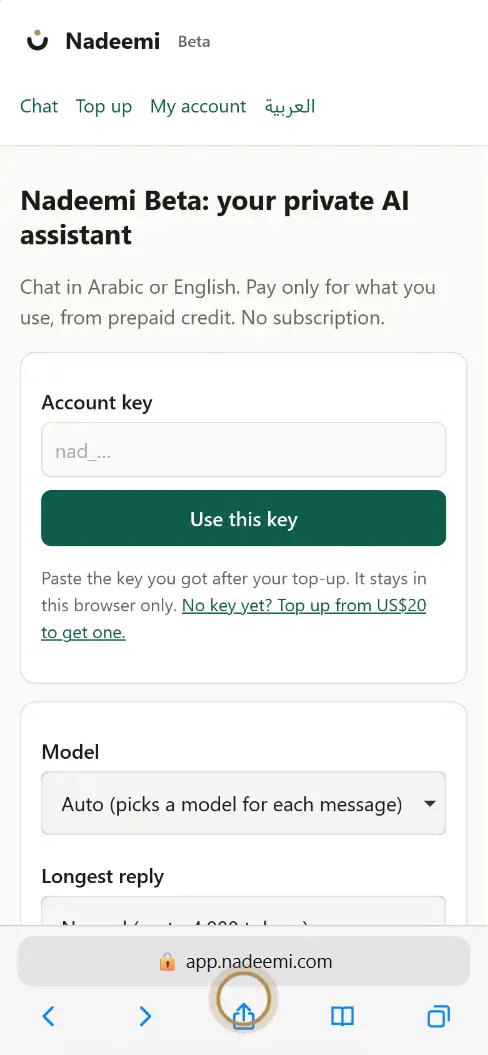
Step 1. Screenshot of the Nadeemi app with a drawn Safari menu. Safari’s buttons look a little different on each iOS version. 1Open app.nadeemi.com in Safari and tap the Share button.
On iOS 26, tap ••• (More) first, then Share. Chrome and Edge on iPhone have Share too.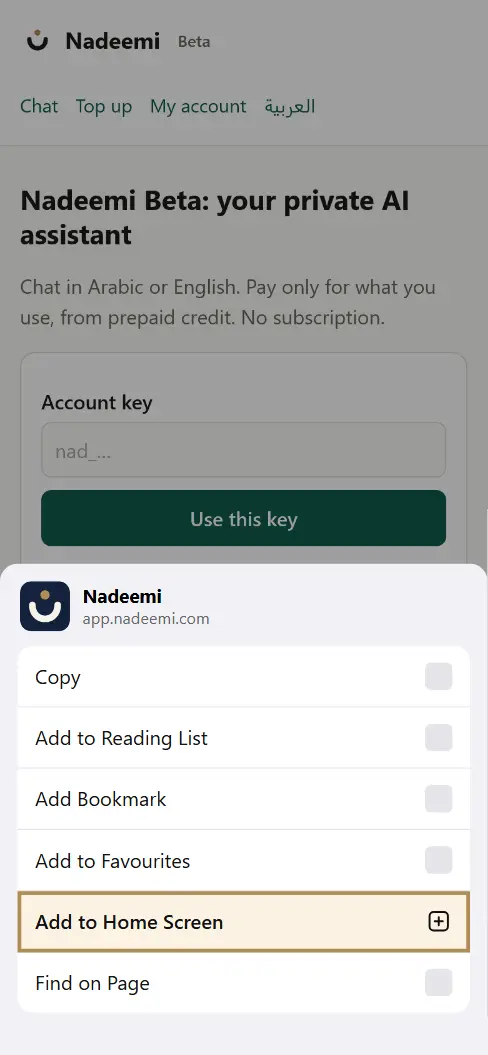
Step 2. Screenshot of the Nadeemi app with a drawn Safari menu. Safari’s buttons look a little different on each iOS version. 2Scroll down and tap “Add to Home Screen”.
Not in the list? Tap “View More” or “Edit Actions” at the bottom.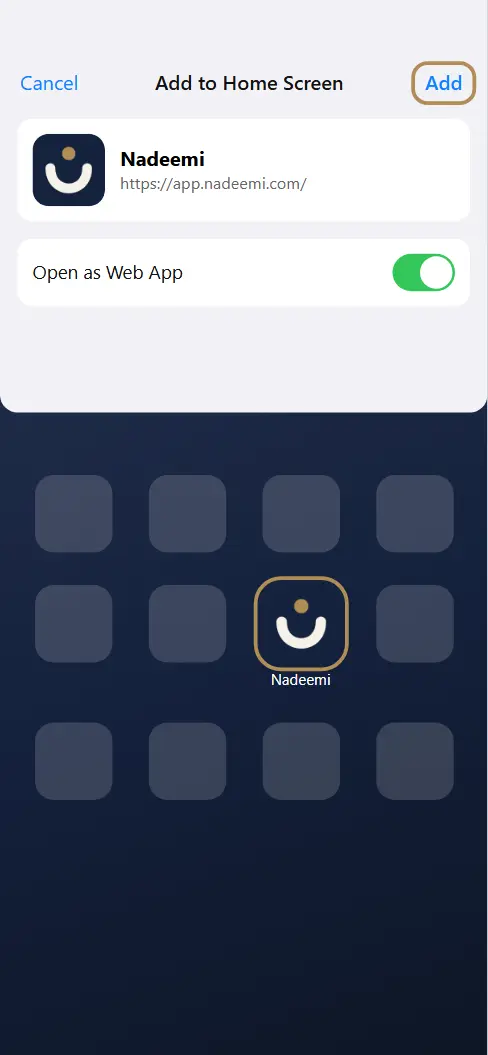
Step 3. Screenshot of the Nadeemi app with a drawn Safari menu. Safari’s buttons look a little different on each iOS version. 3Keep “Open as Web App” on and tap “Add”.
Nadeemi is now on your Home Screen. Open it from there.
Open Nadeemi from its new icon and paste your account key once. The Home Screen app keeps its own storage, separate from Safari.
If your device shows a warning
Our installers are not yet signed with paid developer certificates. So Windows, macOS and Android may say they do not know the publisher. That is a warning about the publisher, not a virus found. Download only through the buttons on this page and check the SHA-256 code first.
Windows: “Windows protected your PC”
Check the SHA-256 code (below). Then click “More info”, and “Run anyway”. Your browser may also ask you to “Keep” the file first. On Windows 11 with “Smart App Control” switched on, unsigned apps are blocked with no “Run anyway” button. Then use “Install from your browser” instead: it works the same and needs no settings.
Mac: “Apple could not check it for malicious software”
Click “Done” (not “Move to Bin”). Open System Settings, then Privacy & Security. Scroll down and click “Open Anyway”, then enter your Mac password. If the Mac says the app “is damaged”, delete it and use the browser install instead. We will never ask you to paste Terminal commands.
Linux: the AppImage does not open
Right-click the file, Properties, then allow it to run as a program (or run chmod +x on it). On Ubuntu 22.04 and later you may need the libfuse2 package. For the .deb: sudo apt install ./ followed by the file name.
Android: “For your security, your phone is not allowed to install unknown apps”
Tap “Settings”, switch on “Allow from this source”, go back and tap “Install”. If Google Play Protect warns you, tap “More details”, then “Install anyway”. From 2026, Google is starting to block apps from unverified developers outside Google Play in some countries. If your phone refuses, use “Install the app” instead: it needs no settings at all.
Check the file (SHA-256)
The checksum shows the file arrived complete and unchanged, the same as the copy on our server. It does not replace a publisher signature. Compare it with the code shown next to your download:
- Windows (PowerShell)
Get-FileHash .\FILE -Algorithm SHA256- Mac (Terminal)
shasum -a 256 ~/Downloads/FILE- Linux
sha256sum FILE
What you get
Its own app
Own icon and window, away from your browser tabs.
Arabic and English
Right-to-left done properly, on every device.
Same account everywhere
One account key, same credit, same prices and privacy rules as the web.
Always up to date
Each version opens the latest Nadeemi Beta. It needs an internet connection.
Questions
Why not the App Store or Google Play?
So you can have Nadeemi now, with no store between us. Store versions may come later. On iPhone and iPad, Apple allows apps only from its App Store, so there the web app is the way in.
Is it the same Nadeemi as the website?
Yes. Every version runs Nadeemi Beta from app.nadeemi.com: the same account key, credit, prices and privacy rules.
Does it cost anything?
Downloading is free. Chatting uses your prepaid Nadeemi Beta credit, the same as on the web.
How do I remove it?
Like any app: press and hold the icon on a phone; use Settings, then Apps on Windows; drag it to the Bin on a Mac. Your chat history is stored on your device, so export it first if you want to keep it.
Stuck? Email info@nadeemi.com and tell us your device. We will walk you through it.
Download only through this page. The files come from our download server, nadeemi-download.starting2727.workers.dev. We never send installers by email or chat. Version 1.0.1, 2026-10-30